Calendar · Local first

See your days clearly,
right from the menu bar.

Check your calendar from the Mac menu bar or your browser. Lunar dates, solar terms, and moon phases are computed on your device; system calendars sync read-only, and location is used for moon phase only — never uploaded.

macOS 13+ · 简体中文 / 繁體中文 / English / ไทย · GPL-2.0

Thu Sep 24
Daylight 2.0.5: Luna calendar with lunar dates, holidays, adjusted workdays, moon phase, solar-term artwork, and a daily note.

Clients

Your calendar, on Mac and in your browser

Menu bar and browser each do what they do best; lunar dates, solar terms, and your notes stay on-device — no cloud required.

v2.0.5 · macOS 13+

macOS menu bar app

Click the menu bar icon to check dates and upcoming events. See calendars you already use on your Mac, including iCloud, Google, and Exchange. Click an event to open it in Calendar.

  • Choose Luna for a quick daily view or Sol for a more spacious calendar
  • Subscribe to holiday calendars or add your own calendar links
  • 3D Moon model; location stays on-device
  • Diary with todo items; type [] buy milk for checkable todos; export as JSON
  • Customizable menu bar display items; launch at login
  • Automatic updates for the direct-download edition
Chrome · Edge

Browser extension

Available on Chrome Web Store and Microsoft Edge Add-ons. Toolbar moon icon, dark mode, on-device lunar dates and 24 solar terms, date marks and diary.

  • Lunar date and 24 solar terms, computed on-device
  • Dark mode
  • Date marks and diary
  • Holiday calendar subscriptions
  • Info screen and keyboard shortcuts
  • Toolbar moon icon
Luna · default

Your day at a glance

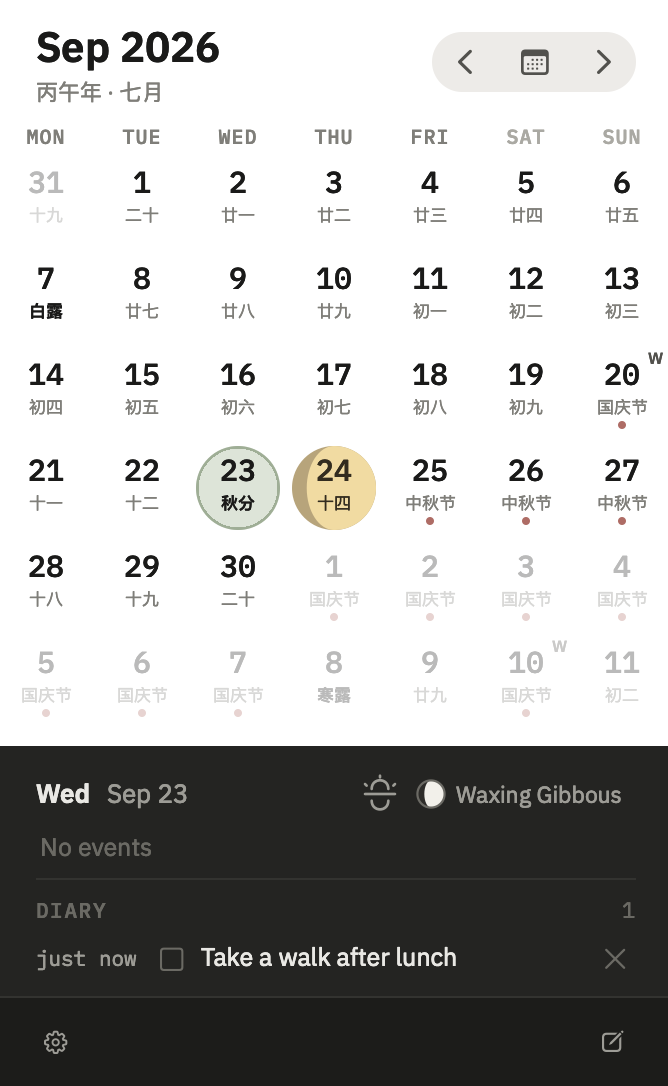
Open a small calendar whenever you need it. Select a day to see your events, notes, and todos together, with the moon phase close at hand. Colored dots make busy days easy to spot.

Sol

More room to explore

Browse a larger calendar with lunar dates, solar terms, and week numbers. Check the moon phase or jot down a note for any day. Click the heading to jump between months and years.

Features

Features at a glance

Keep track of dates, plans, and the little things you want to remember.

Lunar date & 24 solar terms

Lunar dates and 24 solar terms, computed on-device. New botanical line-art icons use three gentle colors, with compact artwork on Mac and detailed icons in the browser. Icons follow your lunar-date setting.

System calendar

See events from your Mac calendars without changing them. Colored dots mark busy days; select a date to see its schedule and links to video meetings.

Holidays

Subscribe to holidays for Mainland China, Hong Kong SAR, and Thailand, or add your own iCal feeds. Mainland China includes adjusted workdays, clearly marked even when lunar dates are hidden. Each subscription has its own color.

Moon phases

See the moon phase for any date. In Luna, today's circle follows the moon, with warm yellow tones in light mode. The optional 3D Moon uses your location on-device — location is never uploaded.

Diary & todos

Free-text diary entries per day on macOS; type [] buy milk (or [ ] / [x]) for todos with checkboxes — completed items strike through. Export as JSON.

Date marks & diary

Color marks and diary entries on individual days in the browser extension.

Menu Bar & languages

Customizable status bar items: moon icon, date badge, day number, lunar day, weekday, and time — reorder as you like. Interface languages: 简体中文, 繁體中文, English, ไทย (Thai shows the Buddhist Era).

Get Daylight

Get Daylight

Free for Mac, Chrome, and Edge. Download Daylight 2.0.5 for macOS below.

macOS menu bar app

Version 2.0.5 · macOS 13 or later · Apple silicon and Intel. Signed and notarized, with automatic updates.